CALE MEDIA
Cale AI Workbench White Paper
CALE MEDIA · HOWELL, MICHIGAN
Cale AI Workbench White Paper
Google Maps SEO, web design, and managed advertising to help local businesses attract more calls and leads.

Small local models. Real work.
On your computer. Even offline.
01 / The big idea
Your computer.
A new kind of capability.
Cale AI Workbench is built around a bold idea: small local AI models can do meaningful work when the software around them helps them plan, use tools, remember progress, and verify results.
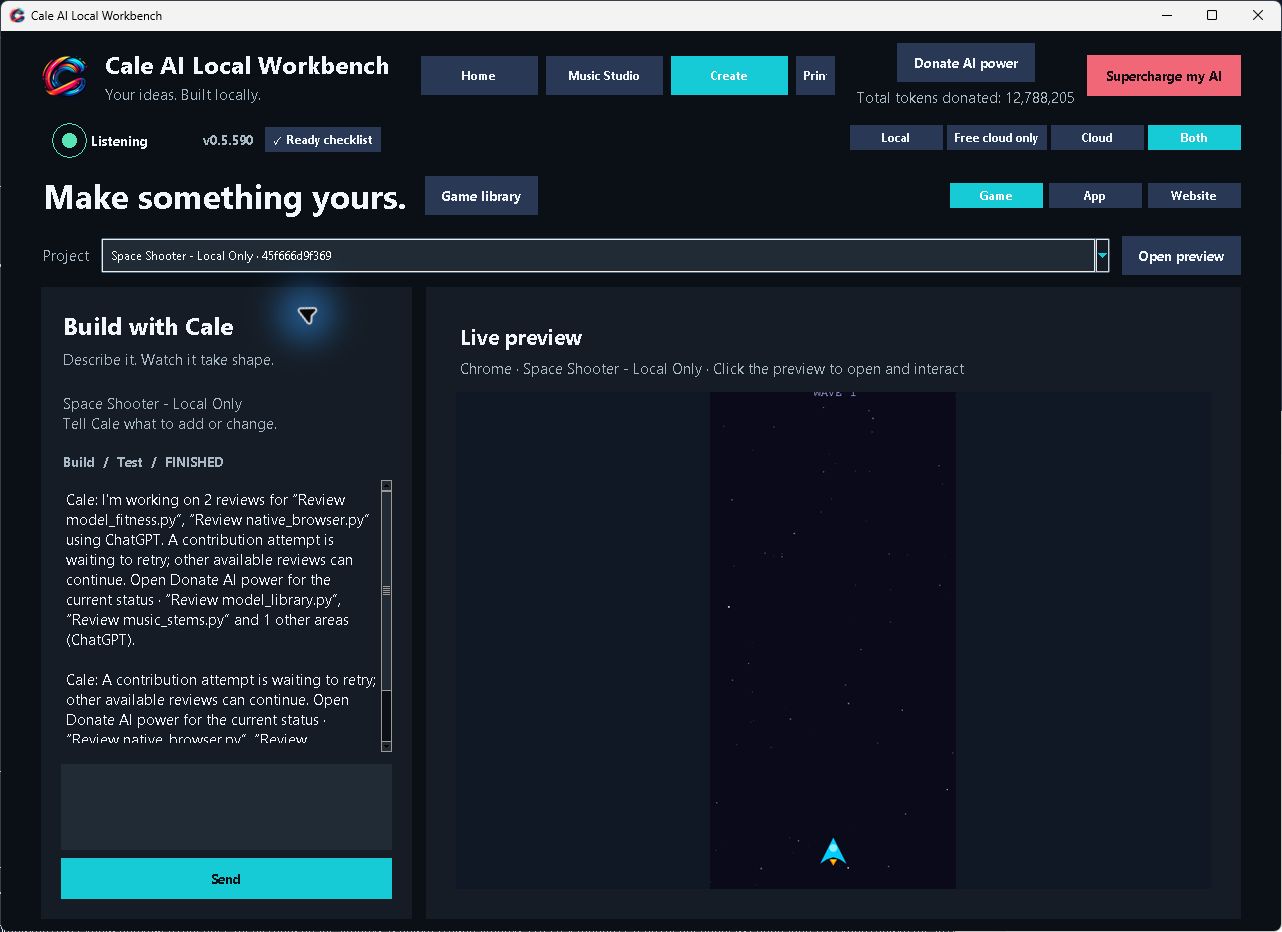
At Cale Media, we see a groundbreaking direction for personal AI: a computer that becomes an active workshop for your ideas. Describe a useful tool. Work through a document. Create music. Build an interactive experience. Keep the project, its files, and its progress in a workspace you can return to.
Workbench is an open-source Windows application that connects local models with persistent tasks and practical tools. It also brings together local feedback learning, SQLite project memory, and optional automated specialist-model training. Its ambition is to make advanced AI workflows accessible through an everyday desktop experience, with offline operation as a core capability and optional cloud choices when wanted. Once the necessary models and tools are installed, the app can run its local task workflows without an internet connection.
The most exciting part is already tangible. Recorded local 9B-model runs have built an interactive calculator, repaired Python logic, completed saved task steps, and produced checks that caught deliberately introduced defects. These are bounded demonstrations, but they establish a real foundation for the next stage.
The thesis: the capability of a personal AI system comes from the model and the environment built around it. Better tools, durable memory, and meaningful checks can turn a compact model into a more useful worker.
02 / Why small models
Think beyond
the size of the model.
A 9B model has roughly nine billion parameters. That is a compact model in the context of today’s large AI systems, and it is the size class used in the small-model results highlighted here. Workbench’s design explores how much practical capability can be built around that class of local model.
The model does not have to do everything in its own response. A CSV parser can handle rows precisely. A browser can execute an interface. A database can preserve completed steps. A verifier can test a result again. The model chooses and coordinates actions; the surrounding software performs operations and returns evidence.
This division of work is the opportunity. Instead of repeatedly asking a model to remember a whole project and judge its own answer, Workbench gives the task a persistent structure. Progress can survive a worker restart, source files remain available, and later checks can challenge an earlier result.
Local inference also creates a different relationship with the technology. Model processing can run on hardware under the user’s control, without a paid cloud inference call for each local step. That is not zero-cost computing: hardware, electricity, storage, and setup still matter. It is a route toward more personal control over where the work happens.
Offline by capability. Private by choice.
Local models are about more than model size: they let Workbench run offline and carry out tasks on the computer itself. With the required models, tools, and project files installed locally, a task can move from instructions to execution, saved output, and verification without a cloud inference service.
That gives privacy a strong foundation. In a fully local, offline workflow, prompts, working files, and results can stay on the device. Users control the machine doing the work and can choose when to connect to an outside service. Privacy still depends on the tools and settings in use; enabling a cloud provider or an online integration changes where data may go.
Offline work means using resources already on the device. Live web research, publishing to a website, fetching new models, and other actions that reach online services need a connection. The distinction is straightforward: local work can continue offline; network tasks require the network.
Current development PC
- CPU: AMD Ryzen 9 5900X — 12 cores, 24 threads
- GPU: NVIDIA GeForce RTX 3060 — 12 GB VRAM
- Memory: 128 GB RAM
- Operating system: Windows 11 Pro
This is the current development configuration, not a minimum system requirement. Establishing reliable performance across more modest configurations is part of the roadmap.
03 / What we’ve already proven
Real runs.
Results you can inspect.
The selected November 3, 2026 task trials used local inference. A separate November 4 CPU experiment tested specialist-model training. Each result below links to its saved evidence. The checks were separate from the model’s completion claim; they were developer-run graders, not a third-party audit.
Used in the highlighted app and Python trials.
In the successful fresh calculator run.
Passed by the shipping repair and its verifier.
A working interactive application
A fresh local 9B run built an offline tip-splitting calculator in 304.72 seconds and completed all five saved task units. The grader confirmed calculations, invalid input handling, blank bills, fractional people, and mobile fit. Its saved verifier passed the correct app and rejected deliberately broken JavaScript and targeted behavior regressions.
No verifier was supplied for this run. The result therefore includes both the application and useful verification coverage produced through the workflow. It demonstrates a complete pass for this small app fixture. Inspect the app evidence ↗
Business logic that survived deliberate defects
A local 9B shipping-calculation repair completed in 203.05 seconds, with both saved task units finished. All 11 independent behavior cases passed, covering pricing zones, fractional weights, defaults, and invalid inputs. The saved verifier also rejected all four deliberately defective implementations.
The same report records a temperature-conversion repair completing in 72.65 seconds, passing four reference cases and rejecting the original regression. Neither of these runs began with a supplied verifier. Inspect the Python evidence ↗
Small steps that stayed connected to the goal
A separate trial explicitly identifies Qwen 3.5 9B. It repaired a small Python function and completed two SQLite task units in 50.85 seconds. A known verifier was supplied for this experiment; the worker preserved it, passed the corrected function, and rejected the original bug. This isolates evidence for repair and task coordination, rather than claiming autonomous test creation. Inspect the task-step evidence ↗
Local document work with a source-bound check
A separate automatic-local run summarized a two-page PDF in 106.87 seconds. It used the final terms instead of the superseded draft, calculated the net amount correctly, and produced a verifier that rejected both an incorrect total and a changed source. This is additional local-workflow evidence; its routed model aliases do not establish that it was a small-model-only run. Inspect the document evidence ↗
A real specialist-training experiment—with a quality gate
The November 4, 2026 training receipt records a CPU worker producing and evaluating a compact classifier in about 2.93 seconds. Its accuracy was 61.35%, below the 75.19% baseline that always predicted “out of scope,” so it failed screening. The candidate stayed local and inactive, with no upload.
This establishes that the training, evaluation, and rejection path ran. It does not establish an improvement to the assistant or a qualified routing model. Inspect the actual training receipt ↗
What these results establish: small local models, supported by Workbench’s tools and task structure, have completed specific useful workflows with checks that detect real defects. Timings are individual observations from evolving developer builds, not averages, a controlled speed comparison, or a general reliability rate.
We also retain the failures. Earlier calculator runs missed test coverage, and larger expense-app and game trials did not complete successfully. Those gaps identify the next engineering work: stronger requirement coverage, more dependable planning, and repeatable completion as projects grow. Read the full benchmark record ↗
04 / The technology
Give a small model
a stronger workshop.
Workbench combines four ideas that make the demonstrated workflows possible.
- 01PlanA local model turns your request into manageable steps.
- 02Use toolsCode, documents, media and other task-specific runtimes.
- 03Check & reviseRun saved checks; return failures to the worker.
- 04Keep the resultSave project files and evidence you can inspect.
Workers save progress and retrieve context when work resumes.
Tools that do real work
The worker can read and edit project files, execute commands, inspect documents, and interact with a task browser. Structured tools support operations such as CSV transformations and repeatable browser checks.
Memory outside the conversation
Local task records, saved plans, progress files, and project search keep useful context available across work sessions. The project has a durable state beyond the model’s latest answer.
Checks tied to the current result
Saved acceptance checks can be replayed after changes. The task supervisor independently reruns a project verifier before handoff. New instructions and changed files can require fresh evidence.
The right runtime for the job
Ollama supplies local language models, while separate tools and runtimes handle media and other specialist work. Model routing respects eligible models, hardware, and explicit user choices. Native workers handle new general tasks, with a legacy Hermes path retained for older work.
A passing test proves the behavior it covers. It cannot supply a requirement the model overlooked. That is why the benchmark work challenges verifiers with broken outputs, and why broader coverage remains a development priority. Explore the architecture ↗
05 / Local learning & persistent memory
More than a model.
A system that can learn and remember.
Workbench brings small-model training, feedback learning, and durable project memory into the same local workspace. Each has a different job—and together they give personal AI more ways to become useful.
- 01Reviewed dataDefined labels and a verified public dataset cache.
- 02CPU trainingFit a small TF-IDF / logistic-regression classifier.
- 03Held-out testsCompare unseen examples with a simple baseline.
- 04Quality gateScreen the candidate before any activation review.
Automatic training for small specialist models
With a separate opt-in, Workbench can schedule CPU training experiments for compact intent classifiers: models that learn to sort requests into defined categories. The current process uses reviewed public CLINC data, trains a local model, evaluates held-out examples, and records the result. Its TF-IDF and logistic-regression approach is established machine learning, packaged into an automated experiment workflow.
Use a fixed dataset and defined labels.
Fit a compact specialist model.
Measure performance against baselines.
Keep weak results local; qualified submissions remain inactive for review.
This classifier workflow does not retrain the main 9B assistant. A benchmark score alone does not make a candidate eligible to direct Workbench tasks. Read the training design ↗
Learning from your feedback
Explicit reviews are saved locally and matched to relevant later tasks using text similarity. This gives Workbench a way to retrieve lessons about what the user wanted. It is learning through remembered examples; the feedback store does not change the language model’s weights or upload those examples. Inspect local feedback learning ↗
SQLite: memory that survives the conversation
SQLite is the embedded database behind project memory, saved task steps, and execution checkpoints. Workbench can retain requirements, decisions, lessons, and searchable project material, then give a worker a focused briefing when it resumes. A separate experiment ledger records training conditions and outcomes, helping avoid repeating completed experiments after a restart.
For a small model, that structure matters: the software preserves state outside its limited conversational context. SQLite supplies storage and search; training changes a specialist model’s fitted parameters; feedback retrieval brings relevant past examples into new work. These are complementary capabilities. Explore the memory and experiment architecture ↗
Where we see the breakthrough: bringing local execution, persistent memory, verification, and evaluated specialist training together in a practical desktop workbench. The opportunity is to make a compact model more capable through the system around it—and measure each improvement.
The current automated public-data training process excludes private prompts and files. Acquiring datasets or submitting an optional contribution requires a connection; local training can use the verified dataset cache once the required runtime and data are installed.
06 / What this opens up
A personal AI workshop
for builders and creators.
The small-model results point toward a practical future: useful software and creative tools closer to the people who need them. An owner could prototype a small internal calculator. A creator could move from a music idea into an editable local media workflow. A learner could inspect the generated files, change the brief, and see how the system responds.
Software & business logic
Application building, Python repair and checks that caught deliberately introduced defects.
Explore the run evidence ↗Documents & source checks
A two-page PDF summary with checks for an incorrect total and changed source. Small-model-only routing was not established.
Explore the document evidence ↗Music & creative media
Music Studio, image generation, speech, audio and video tools extend the workspace beyond coding.
See the real Music Studio ↗Physical production
Print Farm brings printer status, camera inspection and automatic-printing controls into the app.
See the AI Print Farm ↗Memory & learning
SQLite task state, feedback retrieval and evaluated specialist training each serve a different purpose.
See the learning workflow ↗Larger connected projects
Make multi-tool projects more repeatable, test smaller hardware and publish stronger offline evidence.
Explore the roadmap ↗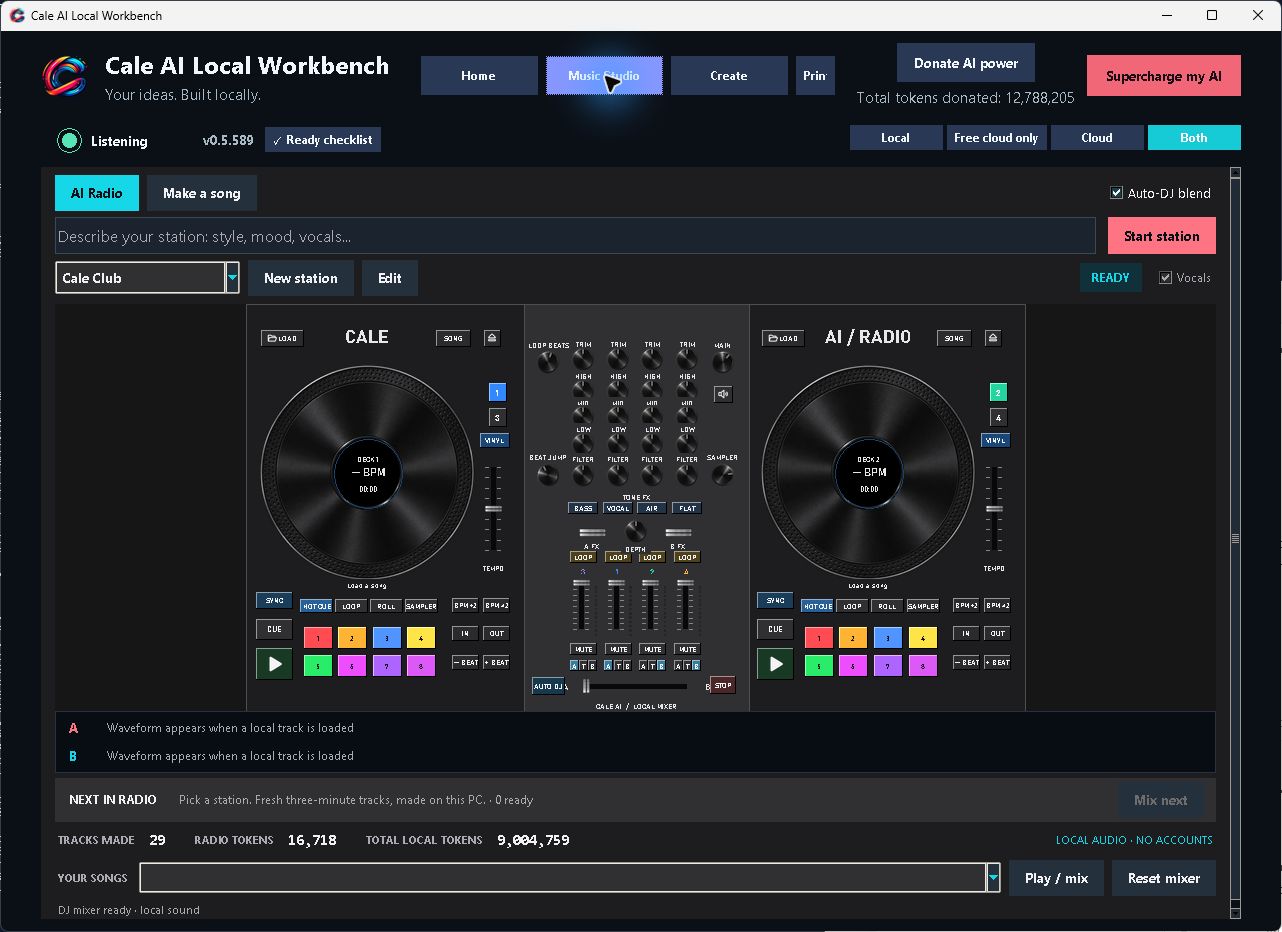
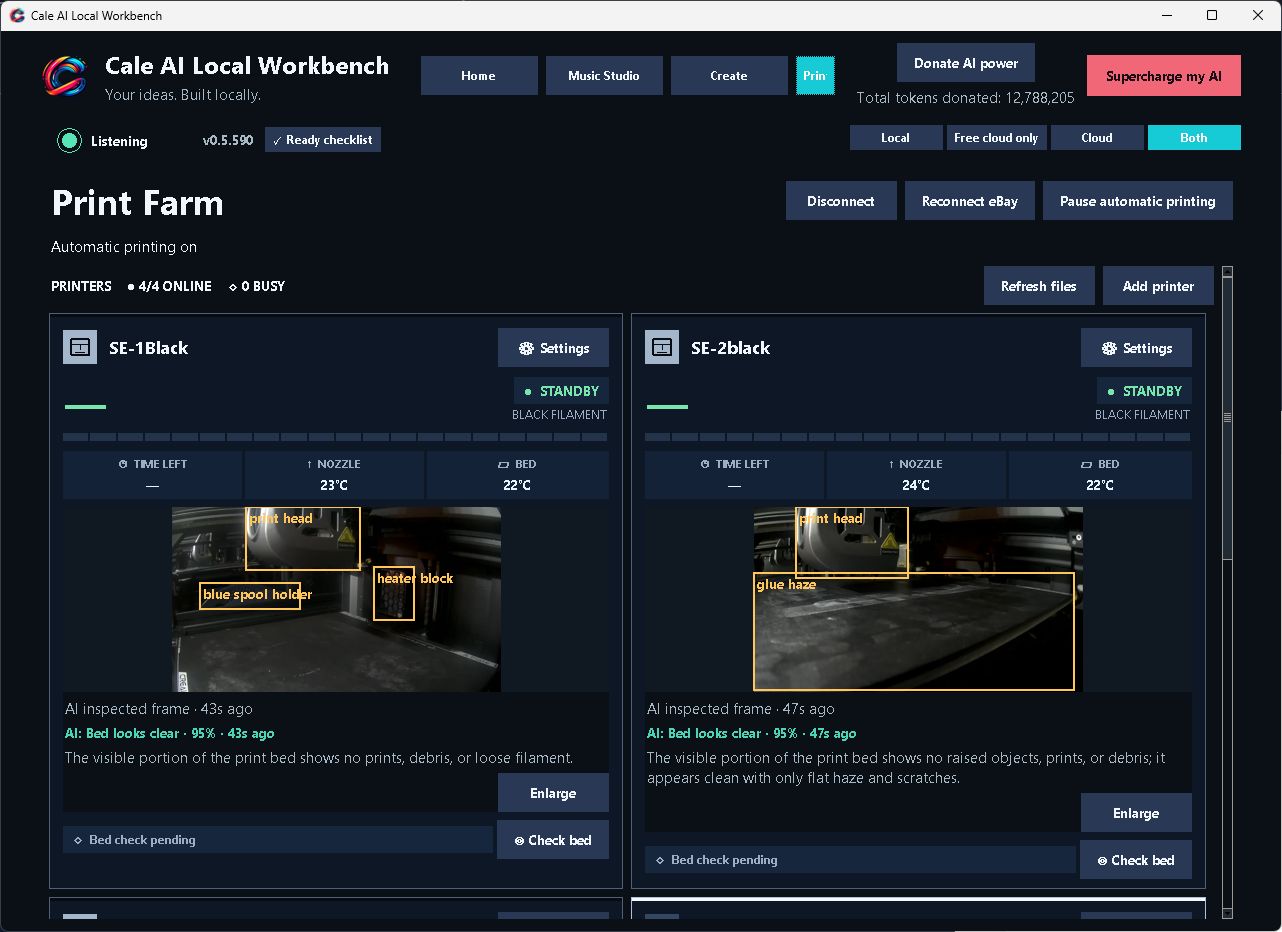
Workbench already documents a wider toolset around that foundation: local image and music generation, speech, audio and video editing, document extraction, small-model training, and public-source research. Recent release notes include a four-deck DJ controller and local webcam tracking. The AI Print Farm workspace also brings connected-printer status, temperatures, camera views, AI bed-inspection annotations, and automatic-printing controls into the same application. The interface capture above shows four printers online; completed unattended production is not established by that screenshot. These are product capabilities with their own hardware and runtime requirements; they are not all established by the 9B coding benchmarks.
The exciting connection is that these tools live alongside ongoing projects. A task can have a brief, intermediate files, a finished artifact, and a path for further work. The long-term opportunity is a workspace where creation feels continuous, from the first idea through revisions.
Offline operation is a core part of the local workflow: the app can keep working with installed models, local tools, and files without an internet connection. Downloads, live web research, updates, and enabled cloud services use the network. An agent with terminal access can modify files with the Windows user’s permissions, so project selection and backups matter. Users should inspect important outputs before relying on them.
07 / Development roadmap
Prove it.
Repeat it. Expand it.
The next chapter is about turning promising local demonstrations into dependable everyday capability.
- 01 / FOUNDATIONShow the work.Keep local task receipts, artifacts, checks and failures inspectable.
- 02 / RELIABILITYRepeat the success.Broader trials, visible offline demonstrations and measured hardware requirements.
- 03 / EXPANSIONConnect more capability.Evaluate specialist gains, complete creative workflows and reviewed community contributions.
The roadmap below proposes the next development priorities from the evidence available today. It describes direction and success criteria, not announced delivery dates or guaranteed features.
NOW / Demonstrated foundation
Useful work with local 9B models
Build on the passing calculator, Python repair, task-step, and verification results. Keep the artifacts, model identities, test conditions, and failures visible so progress can be inspected.
Evidence: linked run reports and separate behavior/regression checks.
NEXT / Make success repeatable
Broader tests. Fewer unfinished tasks.
Repeat fixed tasks across multiple runs, strengthen requirement coverage, and improve recovery when planning or tool arguments go wrong. Include fresh builds and interrupted tasks, not only successful continuations.
Success criterion: publish pass rates, failure categories, and verification quality under consistent conditions.
NEXT / Make offline capability visible
Show the complete workflow with the network off.
Document which models and tools each offline task needs, and publish repeatable demonstrations from request through saved output and verification with networking disabled. Make the boundary between local work and optional online services easy to understand.
Success criterion: reproducible offline task examples, clear setup requirements, and documented data flows for optional connections.
THEN / Make smaller hardware practical
More capability per local resource.
Measure 4B- and 9B-class configurations on a wider range of PCs. Improve context use, tool selection, model routing, and setup readiness while keeping quality checks intact.
Success criterion: tested hardware profiles with memory use, setup footprint, and time to an accepted result.
DEVELOP / Evaluate local learning
Prove when a specialist earns its place.
Expand task-relevant datasets, compare candidates with simple baselines, and measure whether a specialist improves a real workflow. Evaluate feedback retrieval separately from model training, including how outdated lessons are corrected.
Success criterion: repeatable held-out gains and end-to-end task improvements before considering a candidate for activation, with review and rollback controls.
EXPAND / Connect the creative workflow
From isolated tools to complete projects.
Extend evaluation into music, images, documents, video, and mixed workflows. Improve the handoff between specialist tools so a project can keep its original intent through several kinds of output.
Success criterion: reproducible end-to-end examples with technical checks and human review of creative quality.
LONGER TERM / A growing open workbench
Let the community help move it forward.
Grow inspectable examples, reproducible bug reports, and reviewed contributions. Workbench already documents optional AI-power donations that propose draft changes for maintainer review; broader participation can help find the next useful workflows to prove.
Success criterion: accepted improvements backed by relevant tests and transparent release notes.
08 / Be part of the next chapter
Bring an idea.
Help prove what comes next.
Cale AI Workbench is for people who want to explore what personal AI can become by building with it. Download the Windows release, inspect the open-source project, or start with the benchmark evidence. Try a bounded task you understand well and compare the result with your own expectations.
If you find a repeatable success, document the conditions. If you find a failure, make it reproducible. Both help turn a promising technology into a better workbench.
Our direction is clear: make small local models more useful through better engineering around them, and show the work. The demonstrations already exist. The roadmap is about widening what they make possible.
09 / Evidence & sources
Explore the proof yourself.
Prepared by Cale Media on November 7, 2026. The task trial receipts are dated November 3 and the specialist-training receipt November 4; they describe the builds and conditions used for those runs. Product capabilities are drawn from the public project documentation, whose README listed release 0.5.572 when reviewed.
- Actual CPU specialist-training experiment and screening result
- Local feedback-learning implementation
- Specialist classifier training and activation boundaries
- Local 9B application build and recovery evidence
- Local 9B Python repairs, hardware, and defect checks
- Qwen 3.5 9B task-step experiment with supplied verifier
- Automatic-local document workflow evidence
- Full benchmark methodology, successes, and retained failures
- Workbench architecture · Project overview and source · Current releases
The Cale companion source is MIT licensed; third-party runtimes and model weights retain their own licenses. Demonstrated outcomes are specific to the recorded tasks. Proposed roadmap items are future work.
Built in Howell. Open to possibility.